U.S. Bank Mobile Banking
- 4.7
- Rating
- 10.00M
- Installs
- Free
- Price

 Analysis by App-foxy
I spent time using U.S. Bank Mobile Banking as a practical money-management app rather than treating it as a simple account viewer. That distinction matters. A banking app earns its place on my phone when it helps me check what is happening, make routine decisions quickly, and avoid unnecessary trips to a branch or a desktop browser. U.S. Bank Mobile Banking is built for that everyday role, with the U.S. Bank Mobile developer behind it and a clear focus on personal finance.
My overall impression is positive, especially for people who already bank with U.S. Bank and want their accounts available during ordinary moments: checking a balance before paying a bill, reviewing a recent purchase, or moving money without opening a laptop. It is free to install, rated for Everyone, and available for devices running Android 10 or later. The current version is 3.75.71, so users with older phones should check compatibility before planning to rely on it.
How the app feels in everyday banking
The strongest part of the experience is its role as a central place for routine account decisions. I found the app most useful when I opened it with one clear question: “Can I afford this payment?”, “Did that transaction go through?”, or “Do I need to move money before the weekend?” A focused banking app should answer those questions without making me reconstruct my finances from several separate screens, and this one is designed around that kind of quick check.
You May Also Like

 Blood Strike: 2.5 Anniversary
Blood Strike’s Loadouts Turn Every Drop Into a Tactical Gamble
A close look at Blood Strike’s custom loadouts: how fast access to signature weapons reshapes its battle royale rhythm, rewards preparation, and narrows the gap between fights.

 Pandora - Music & Podcasts
Pandora’s Music Is Easy to Start, but Harder to Recover
Pandora’s strength is its low-effort path from a seed to a station. Its weak spot is how much confidence it asks you to place in connection, setup, and quiet recovery.

 8 Ball Pool
 Is Built on Rivalries, Rematches, and Routine
A close look at the rivalries, rematches, shared routines, and unanswered safety questions that turn a quick pool match into a persistent mobile community.

 Samsung Music
’s Quiet Strength Is Playing What You Already Own
Its reach comes less from spectacle than from dependable access to a personal library. That simplicity is both the app’s strongest retention engine and its ceiling.

 AccuWeather: Weather Radar
AccuWeather Review: A Quick, Clear Forecast for Everyday Decisions
For everyday plans, the best forecast is the one you can understand quickly. AccuWeather makes rain timing, radar, and local conditions easy to act on, with a few trade-offs.

 Hill Climb Racing
Why Hill Climb Racing Still Turns Crashes Into One More Run
A tiny car, a bumpy hill and one more upgrade: Hill Climb Racing keeps resurfacing because its simple chaos makes every near-miss feel personal.
More From Our News Desk



Its popularity also gives some context. U.S. Bank Mobile Banking has passed 10 million installs and holds a 4.7 average from around 496 thousand ratings. Those figures do not replace personal testing, but they suggest that the app has become a regular tool for a substantial number of customers rather than a rarely used companion.
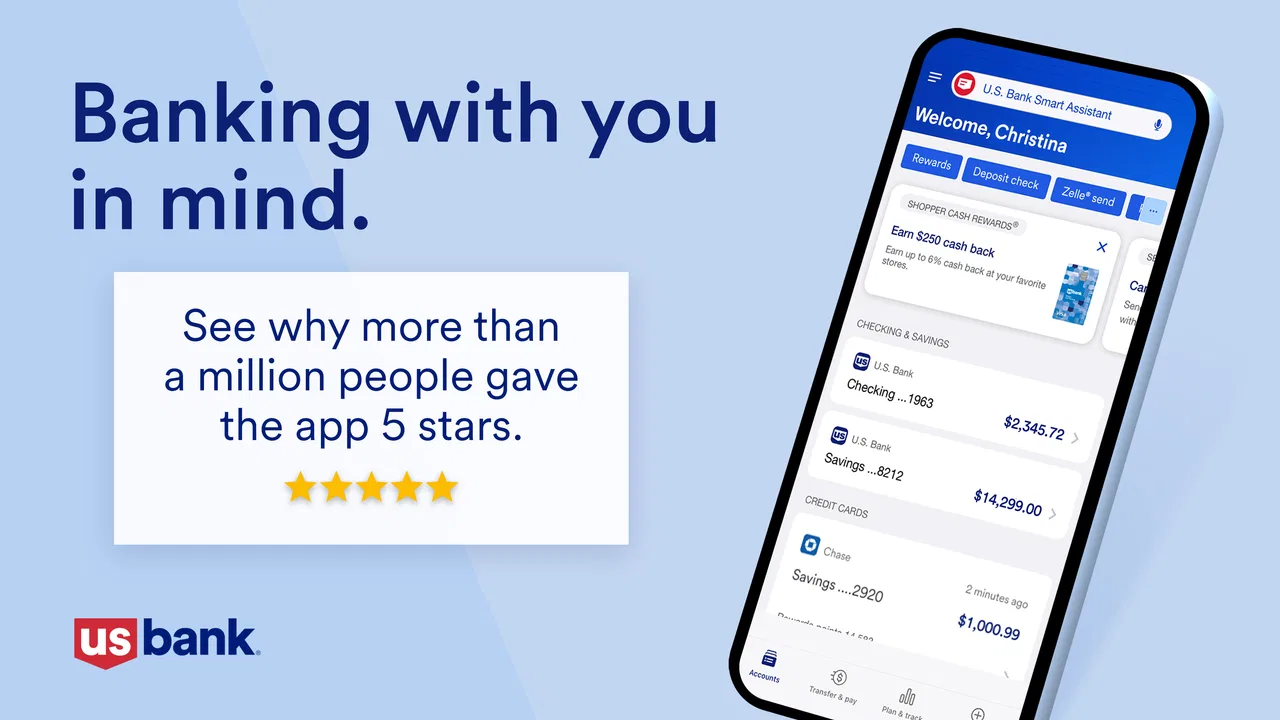
I would describe the interface as functional before decorative. That is a compliment in a financial app. I do not want visual effects competing with account information, and I prefer a layout that lets me move from an overview to a specific transaction without feeling lost. The value is less about discovering something entertaining and more about reducing small points of friction in a task that I may repeat several times a week.
A realistic morning-to-evening workflow
Imagine a payday morning. I open the app to confirm that expected money has arrived, review the latest activity, and decide whether a scheduled payment can safely leave the account. Later, while standing in a shop, I check the available balance before using my card. In the evening, I look over the transaction list and investigate anything unfamiliar while the purchase is still fresh in my memory. That sequence is where a mobile banking app proves its worth: not through one impressive action, but by shortening several small decisions.
One useful habit is to separate “balance checking” from “transaction checking.” A balance can look reasonable while a recent card payment, pending item, or transfer changes what is actually available for immediate spending. I would open the activity view whenever the amount matters, especially before a large payment. This is a simple workflow, but it prevents the common mistake of treating one headline number as the whole financial picture.
Another practical tip is to use the app as a review checkpoint rather than only an emergency tool. A quick look after a busy day can reveal duplicate purchases, an amount that seems wrong, or a payment that was sent to the wrong place. Catching those details early is more useful than waiting until the end of the month and trying to remember what happened.
Where it fits among banking alternatives
Compared with a desktop banking website, the mobile app is better suited to short, frequent checks. I can use it while away from home and do not need to arrange my day around a larger screen. The website may still feel more comfortable for someone who wants to study many transactions at once, print information, or handle a complicated financial task with several browser windows open. For quick account awareness, the phone is the more natural tool.
Compared with a general budgeting app, U.S. Bank Mobile Banking has a different advantage and a different boundary. A dedicated budgeting service may be better for combining accounts from several banks, setting up a broad household plan, or analyzing spending across a larger financial picture. The U.S. Bank app makes more sense when the account relationship itself is the center of the task. If most of my money is held elsewhere, installing it may not solve the bigger problem of seeing everything together.
It also differs from a digital-only finance app. A newer challenger may emphasize a streamlined onboarding flow or a highly specialized budgeting experience, while this app is tied to the U.S. Bank relationship. That connection is useful for existing customers, but it is also the main reason not to choose it casually. Someone who does not use U.S. Bank should not expect the app to become a universal money dashboard simply because it is free.
What the current release tells me about its direction
The app has been available since October 4, 2011, which gives it a long product history rather than the feel of a newly launched experiment. The current version, 3.75.71, shows that it continues to receive product attention. I see that as evidence of ongoing maintenance and evolution, not proof that every part of the experience has been redesigned or that every future improvement is guaranteed.
That distinction is important when judging a financial app. A version number can tell me which release I am using, but it cannot by itself tell me how much a feature changed or whether a particular screen will feel different on every device. I would treat the current release as the version to evaluate today, while keeping expectations about future updates separate from what is already available.
The long history also helps explain why the app feels oriented toward established banking routines. It is not trying to replace every financial service in one place. Its sensible role is to bring the bank relationship into a mobile format and make recurring actions more accessible. For existing users, that continuity can be more valuable than a flashy redesign that forces them to relearn basic tasks.
What existing customers may notice
For someone who has used earlier versions, the most meaningful effect of a current release is likely the general reliability of familiar workflows. Banking customers tend to care about whether they can reach their accounts, understand recent activity, and complete a routine action without confusion. Product evolution is successful when it improves those moments without making the core path harder to recognize.
I would recommend that existing users update before judging the app, especially if an older installation feels slow or inconsistent. After updating, I would spend a few minutes checking the account overview, transaction history, and the actions I use most often. That small review is worthwhile because an interface can change just enough to affect muscle memory, even when the overall purpose remains the same.
There is also a security-minded reason to keep expectations realistic. A mobile banking app should be treated as a sensitive access point, not as an ordinary social or shopping app. I would avoid reviewing account details on an unsecured public device, keep the phone itself protected, and confirm important transaction information before submitting it. The app can make banking more convenient, but convenience should not turn into automatic approval of every prompt.
Three less obvious ways I would use it
First, I would use transaction review as a personal record-keeping routine. Instead of waiting for a monthly statement, I can check activity after a trip, a home repair, or a busy week of small purchases. This helps me connect real-world events to account activity while the details are still easy to recall. It is especially useful when several similar transactions appear close together.
Second, I would use the app before making a transfer or payment that affects the rest of my week. The important question is not simply whether the account has enough money at this moment, but whether the action leaves room for commitments that have not yet cleared. Looking at recent activity immediately before acting creates a more reliable decision than relying on memory or an earlier balance check.
Third, I would make the app part of an “unfamiliar activity” routine. If I see a purchase I do not recognize, I would first compare the date and amount with receipts, subscriptions, shared household spending, or a merchant that uses a different billing name. That extra step can distinguish a legitimate but confusing charge from a genuine problem. The app is most valuable here as an early-warning window, not as a substitute for careful verification.
Where the experience still has limits
The main limitation is that a bank-specific app cannot automatically solve a multi-bank financial life. If I use several institutions, I may still need another tool to see a complete picture. That can create duplicated work: checking this app for one account, switching elsewhere for another, and then reconciling the information mentally. For a person who wants a single cross-bank budget, a broader finance service may be a better fit.
The other trade-off is screen size. A phone is excellent for a quick balance or a recent transaction, but less comfortable when I want to compare a long history, investigate many categories, or plan a complicated set of payments. I would not choose the mobile app as my only environment for detailed financial administration. I would use it for speed and access, then move to a larger screen when the task requires concentration.
Users who dislike mobile authentication, prefer paper records, or rarely manage money away from home may gain little from installing it. The app is also not a replacement for financial judgment. It can present account information and support routine banking, but it cannot decide whether a purchase fits a long-term plan or whether a suspicious transaction is truly unauthorized. Those decisions still require the user’s attention.
Because the app handles sensitive information, I would also avoid treating every notification or message as automatically trustworthy. A careful user should open the app through the normal installed application, inspect the relevant account activity, and avoid sharing login details. That is not a criticism unique to U.S. Bank Mobile Banking; it is a necessary habit whenever a phone provides access to money.
Who should install it, and who should skip it
I think it is a strong choice for U.S. Bank customers who want convenient mobile access, check their accounts regularly, and prefer handling short banking tasks from a phone. It is particularly suitable for people who travel locally during the day, manage several recurring payments, or want to review activity soon after purchases. The free price removes the usual trial-cost concern, and the Everyone rating makes it broadly approachable from an age-classification perspective.
I would be more hesitant to recommend it to someone looking for a complete budgeting command center. If the main goal is to combine accounts from different institutions, build a detailed household spending plan, or analyze long-term trends, a dedicated personal finance tool may offer a better structure. Likewise, people who do nearly all banking on a desktop may find the app useful as a backup but not essential as their primary workspace.
The app has been available for more than a decade and is now used by over 10 million people through its installs, which makes its continued presence unsurprising. Still, scale should not be confused with universal suitability. The right question is whether U.S. Bank is where I actually manage money and whether mobile access solves a problem I regularly have.
What I would watch in future updates
I would pay attention to whether future releases make important information easier to distinguish at a glance, particularly when a balance and recent activity tell slightly different stories. Clearer explanations around transaction status, transfers, and payment timing would have practical value because those are the areas where a hurried user can make an avoidable mistake.
I would also watch how the app balances simplicity with depth. Adding more tools can help experienced customers, but every extra option can make a basic check slower. The best evolution would preserve a short path for everyday tasks while giving advanced users more control when they deliberately look for it.
Finally, I would look for improvements that help customers understand their financial position without pretending that a bank app is a full budgeting system. Better context can support better decisions, but the app should remain clear about what belongs to account management and what requires a separate planning tool. That balance will matter more to me than a cosmetic redesign.
My recommendation is straightforward: if you bank with U.S. Bank and want a dependable mobile companion for checking activity and handling routine money tasks, I think U.S. Bank Mobile Banking is worth trying. Its free access, established history, current version, and strong user response make it an easy app to consider. I would not present it as the perfect solution for multi-bank budgeting or detailed financial analysis, but within its proper role it is practical, focused, and genuinely useful.
FAQs for U.S. Bank Mobile Banking
01What features does the U.S. Bank Mobile Banking app offer?
The U.S. Bank Mobile Banking app provides a wide range of features designed to simplify financial management. Users can check account balances, view transaction history, transfer funds, pay bills, and deposit checks using their smartphone camera. Additionally, the app offers budgeting tools, personalized alerts, and secure login options such as fingerprint or facial recognition.
02Is the U.S. Bank Mobile Banking app secure?
Yes, the U.S. Bank Mobile Banking app prioritizes user security. It employs advanced encryption technologies to protect user data and offers multi-factor authentication options. Users can enable fingerprint or facial recognition for an added layer of security. Additionally, the app has built-in fraud detection measures and real-time alerts for suspicious activity.
03Can I deposit checks using the U.S. Bank Mobile Banking app?
Yes, the U.S. Bank Mobile Banking app allows users to deposit checks electronically. Simply take a photo of the front and back of the check with your smartphone camera. Ensure the check is endorsed and follows the app's guidelines for successful deposit. Users will receive a confirmation once the deposit is processed.
04Are there any fees associated with using the U.S. Bank Mobile Banking app?
The app itself is free to download and use. However, standard account fees may apply for certain transactions. It's important to review your specific account terms and conditions for any applicable fees. Also, note that data charges might apply based on your mobile provider's plan.
05What should I do if I encounter issues with the app?
If you experience any issues with the U.S. Bank Mobile Banking app, first ensure your app is updated to the latest version. Check your internet connection and restart your device. If problems persist, U.S. Bank offers customer support through their website and app, or you can visit a local branch for assistance.
Pros
- User-friendly interface for easy navigation.
- Comprehensive account management features.
- Secure login with fingerprint and Face ID.
- Real-time transaction alerts available.
- Convenient mobile check deposit feature.
Cons
- Limited features for business accounts.
- Occasional app crashes reported by users.
- Some features require strong internet.
- No budgeting tools integrated.
- Slow customer support response times.

U.S. Bank Mobile Banking
Gallery